Unlock Your 2026 Study Superpowers: AI Workflows, Smart Prompts & Digital Assistants for Students
Key Takeaways
- AI tools are a 2026 reality for students, unlocking academic superpowers.
- AI acts as a personal team: librarian, tutor, brainstormer, and organizer.
- These study tools are powered by Large Language Models (LLMs).
- Mastering smart prompting is crucial for leveraging AI effectively.
- AI fluency is a fundamental 2026 competency for future academic success.
Picture this: buried under a mountain of textbooks for final exams, brewing a fifth cup of coffee at 2 AM, staring at a dense paper, and wishing for a miracle—a tutor who is always available, a research assistant who can summarize a hundred pages in seconds, and an automated partner that instantly synthesizes practice quizzes from complex study materials. Today, in 2026, that vision is a concrete engineering reality powered by modern Artificial Intelligence. This guide serves as a comprehensive masterclass for harnessing these capabilities responsibly—unlocking academic efficiency, deepening conceptual retention, and eliminating procedural friction with the most effective AI Study Tools available.
Comprehensive Foundations & Concept Primer
Before we dive into the deep end, let’s start with the absolute basics. I know the term “Artificial Intelligence” can sound intimidating, like something out of a sci-fi movie. But for our purposes, I want you to think of AI in a much simpler, more practical way.
What is AI for Students, Really? An Analogy
Imagine you have a team of brilliant, infinitely patient, and incredibly fast interns at your beck and call, 24/7.
- One is a Master Librarian: It has read nearly every book, academic paper, and website. You can ask it to find sources, explain complex topics, and connect ideas from different fields.
- Another is a Socratic Tutor: It won’t just give you the answer. It will ask you probing questions, challenge your assumptions, and guide you toward discovering the answer yourself, strengthening your critical thinking.
- A third is a Creative Brainstormer: Stuck on an essay topic? This intern can generate dozens of unique ideas, help you structure your arguments, and even suggest counter-arguments you hadn’t considered.
- And a fourth is a Personal Organizer: It can take your messy lecture notes, textbook chapters, and scribbled ideas and instantly turn them into a structured study guide, complete with flashcards, summaries, and practice questions.
This “team” is, in essence, what modern AI learning tools offer you. They are built on what we call Large Language Models (LLMs)—complex systems trained on vast amounts of text and data. When you give an AI a “prompt” (which is just a fancy word for an instruction or a question), it uses its training to predict the most logical and helpful sequence of words to form a response. It’s not “thinking” like a human, but it’s an incredibly powerful pattern-recognition machine. The magic, and the skill you’ll learn here, is in how you ask.
Why This is Essential for the Class of 2026
Just a few years ago, using these tools felt like a novelty. Today, and certainly by the time you graduate, fluency in AI will be as fundamental as knowing how to use a word processor or a search engine. The world of work you’re preparing for is already integrating these technologies. Learning to leverage AI now isn’t just about getting better grades; it’s about developing a core competency for your future career. The goal of student AI productivity isn’t to replace your brain; it’s to augment it. It frees up your cognitive bandwidth from tedious tasks—like summarizing dense texts or formatting citations—so you can focus on what truly matters: critical analysis, creative insight, and genuine understanding. This is the new frontier of AI-powered study techniques.
Prerequisites & Complete Environment Setup
Alright, let’s get our hands dirty. Before you can start commanding your AI team, you need to build their headquarters. A well-organized digital environment is the difference between chaotic, sporadic AI use and a streamlined, powerful workflow. This setup is not about complex coding; it’s about being intentional with your digital tools.
Step 1: Choose Your Core AI Chat Interface
This will be your primary “conversation partner.” It’s where you’ll do most of your prompting and dialogue. In 2026, the two dominant players are Google’s Gemini and OpenAI’s ChatGPT.
- Google Gemini (Advanced): Often has the edge in real-time information and integration with other Google services (like Docs, Scholar, etc.). It’s fantastic for research that requires up-to-the-minute data.
- OpenAI’s ChatGPT-4o: Renowned for its creative and nuanced text generation, making it a powerhouse for writing assistance, brainstorming, and Socratic dialogue. Its multimodal capabilities (voice and vision) are also top-tier.
Action: Sign up for a free account on both. The free tiers are incredibly powerful, but consider a student subscription for a month to experience the full capabilities of the most advanced models. This will be your command center.
Step 2: Establish Your “Second Brain” (Note-Taking App)
An AI’s output is useless if it vanishes into a closed browser tab. You need a central place to store, organize, and—most importantly—rework the insights you gain. This is your “Second Brain.”
- Notion: My personal favorite for its flexibility. You can create databases, link notes, and embed almost anything. It’s perfect for building a personal wiki for your courses.
- Obsidian: For those who love connecting ideas. It uses a graph-based system to show you how your notes link together, which is incredible for seeing the bigger picture.
- Evernote: A classic for a reason. Its web clipper is second to none for quickly saving articles and sources you find online.
Action: Pick one of these apps and install it on your computer and phone. Create a main “University” page or folder.
Step 3: Organize Your Digital Filing Cabinet
A clean folder structure is non-negotiable. It prevents chaos and saves you hours of searching for that one file you downloaded three weeks ago.
Action: In your computer’s “Documents” folder (or a cloud drive like Google Drive/Dropbox), create the following structure:
/University/
├── SEMESTER_1_2026/
│   ├── [COURSE_CODE_1] - [Course Name]/
│   │   ├── 01_Lectures_&_Notes/
│   │   ├── 02_Readings_&_Sources/
│   │   ├── 03_Assignments/
│   │   │   ├── Assignment_1/
│   │   │   │   ├── _ai_workspace/  (For saving chat logs & generated content)
│   │   │   │   ├── _research/      (For papers, articles)
│   │   │   │   └── _drafts/        (For your actual writing)
│   │   └── 04_Exam_Prep/
│   └── [COURSE_CODE_2] - [Course Name]/
│       └── ...
└── SEMESTER_2_2026/
    └── ...
This structure separates your raw materials from your own work and gives you a dedicated space (`_ai_workspace`) to save important conversations with your AI.
Step 4: Verification Checklist
Before moving on, let’s make sure your environment is ready. Can you check off all of these?
- [ ] I have an account with a primary AI chat tool (e.g., Gemini or ChatGPT).
- [ ] I have chosen and installed a note-taking app (e.g., Notion, Obsidian).
- [ ] I have created the recommended folder structure on my computer or cloud drive.
- [ ] I have a browser extension for my note-taking app or a citation manager (like Zotero) installed.
If you’ve checked all four boxes, congratulations. Your digital campus is built. Now, let’s learn how to use it.
Core Implementation Architecture & Workflow Blueprint
Having the tools is one thing; knowing how to wield them is another. Simply asking an AI to “write an essay” is like giving a master chef a pile of ingredients and saying “make food.” You’ll get something, but it won’t be a gourmet meal. To get exceptional results, you need a workflow—a mental model for how you interact with your digital assistants for learning.
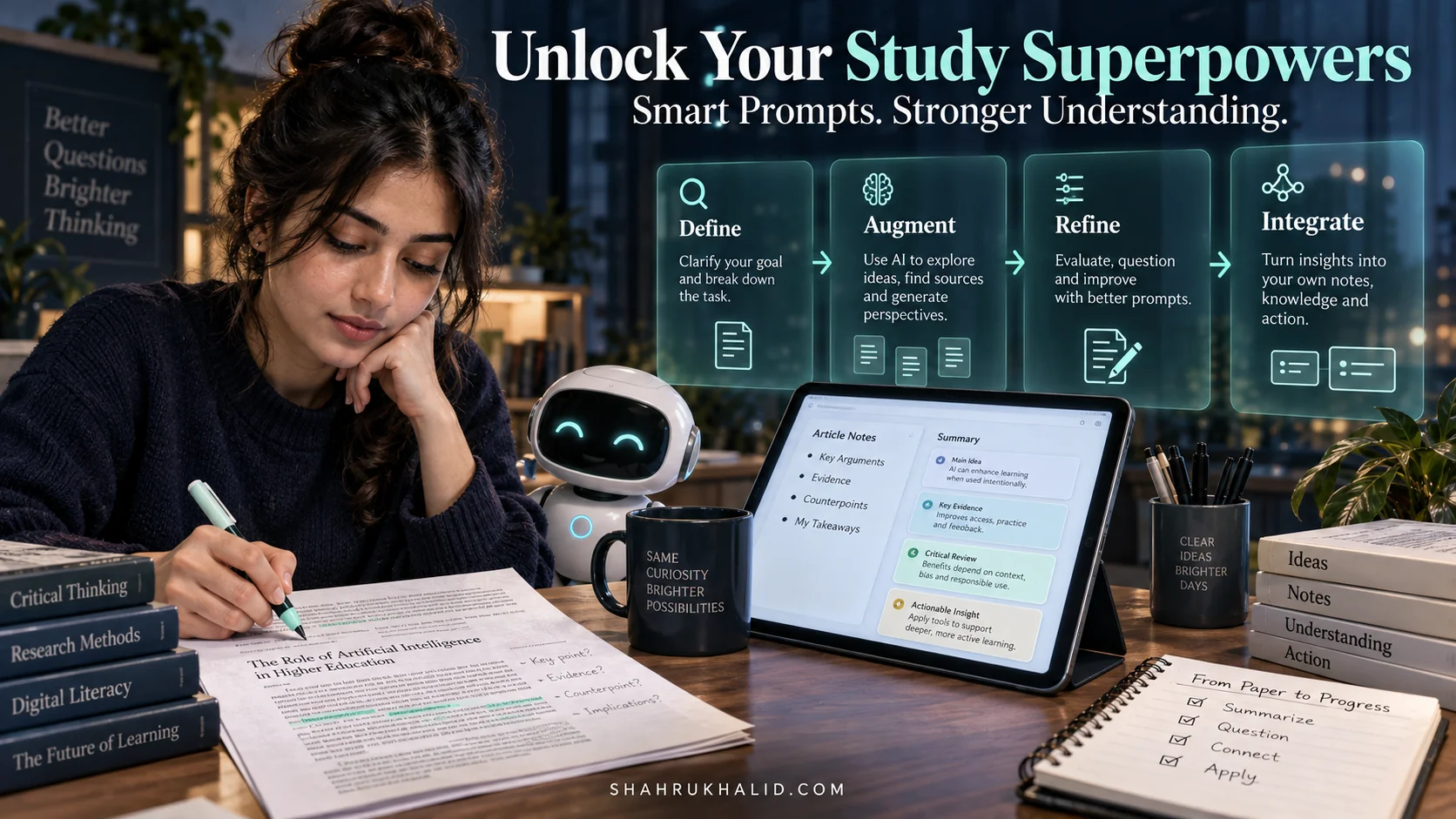
I call my framework the D.A.R.I. Workflow. It stands for Define, Augment, Refine, Integrate. It’s a cyclical process that ensures you remain in control and that the AI serves as a true amplifier of your own intellect.
Let’s visualize this with a card structure.
1. DEFINE (The Prompt)
This is your starting point. You must clearly define the AI’s role, the context of your request, the task you want it to perform, and the format of the output. Never start with a vague question. This is the most critical step in creating smart prompts for students.
Example: Instead of “Explain photosynthesis,” you would say, “Act as a biology tutor. Explain the process of photosynthesis to a first-year university student. Break it down into the light-dependent and light-independent reactions, and use the analogy of a solar-powered factory to explain the energy conversion.”
2. AUGMENT (The Dialogue)
The first response is rarely the final one. Now, you enter a dialogue to build upon the initial output. You augment its knowledge with your questions. This is where you challenge it, ask for clarification, and explore tangents. This is how AI can help students study better—by facilitating a conversation, not just giving a monologue.
Example Follow-ups: “That’s a great analogy. Now, can you create a simple table comparing the inputs and outputs of each reaction?” or “What is the specific role of chlorophyll in this ‘factory’?” or “Are there any common misconceptions about this process?”
3. REFINE (The Deep Dive)
Here, you push the AI to refine the information into more useful formats. You’re no longer just gathering knowledge; you’re shaping it for a specific purpose. This could mean changing the tone, summarizing for a different audience, or generating practical study aids.
Example Refinements: “Okay, now take all of this information and generate 10 multiple-choice questions to test my understanding. Include an answer key with explanations.” or “Summarize our entire conversation into five key bullet points that I can add to my study notes.”
4. INTEGRATE (The Human Synthesis)
This is the final and most crucial step. You take the refined output from the AI and integrate it into your own work—your “Second Brain.” You do not copy and paste. You rewrite it in your own words, connect it to your existing knowledge, and add your own insights. This is the moment the information moves from the AI’s “brain” to yours. This is where learning happens.
Example Action: Copy the key points and quiz questions into your Notion page for the course. In your own words, write a one-paragraph summary of how the “factory” analogy helped you understand the topic.
This D.A.R.I. workflow is your universal blueprint. Whether you’re writing an essay, studying for an exam, or analyzing data, this four-step process will ensure you’re using AI effectively, ethically, and in a way that genuinely enhances your learning.
Hands-on Practical Implementation & Real-World Configuration
Theory is great, but let’s make this real. In this module, I’ll give you heavily commented, production-ready prompts that you can adapt for your own studies. We’ll walk through three common student scenarios using the D.A.R.I. workflow. This is where we answer the question: How to use AI for academic writing and research?
Scenario 1: Mastering a Dense Academic Paper
You’ve been assigned a 30-page research paper filled with jargon. It’s intimidating. Let’s use AI to deconstruct it.
Your Task: Understand and summarize a complex paper for your literature review.
Step 1: DEFINE
Upload the PDF of the paper to your AI tool (most modern ones support this) or copy-paste the abstract and introduction.
Prompt:
>
> Act as a PhD-level research assistant specializing in [Insert Field, e.g., 'Social Psychology']. I have uploaded a paper titled "[Paper Title]". Your task is to help me understand it deeply.
>
> First, provide the following in a structured format:
> 1.  **ELI5 Summary:** Explain the core argument and findings of this paper as if you were explaining it to a smart 15-year-old.
> 2.  **Key Contributions:** In three bullet points, what are the main, novel contributions this paper makes to its field?
> 3.  **Methodology:** Briefly describe the research method used (e.g., qualitative survey, randomized controlled trial, literary analysis).
>
Step 2: AUGMENT
The AI gives you a great summary, but you’re stuck on a specific term.
Follow-up Prompt:
>
> Thank you. In the methodology section, the paper mentions using a 'hermeneutic phenomenological approach'. I have no idea what that means. Can you explain it using an analogy related to being a detective solving a mystery?
>
Step 3: REFINE
Now that you understand it, you need to critique it for your essay.
Follow-up Prompt:
>
> That makes sense. Now, put on the hat of a skeptical peer reviewer. Based on the abstract and the methodology you've described, what are two potential limitations or weaknesses of this study? What questions are left unanswered?
>
Step 4: INTEGRATE
Open your Notion/Obsidian page for the assignment. Create a new entry for this paper. In your own words, write a paragraph summarizing the paper’s argument, methodology, and your critical take on its limitations. Copy the AI’s clear explanation of the difficult term into your personal glossary for the course.
Scenario 2: From a Vague Idea to a Killer Essay Thesis
The blank page is every student’s enemy. Let’s use AI as a brainstorming partner to develop a strong, arguable thesis.
Your Task: Write a 2,500-word essay on “The impact of social media.” (A terribly broad topic).
Step 1: DEFINE
Prompt:
>
> Act as a university writing tutor. I need to write a 2,500-word sociology essay, but my topic, "the impact of social media," is too broad. My personal interest is in how online communities form identity.
>
> Your task: Generate 5 specific, debatable, and original essay questions based on my interest that would be appropriate for a university-level paper.
>
Step 2: AUGMENT
The AI gives you five great options. You like one in particular: “To what extent have niche online communities (e.g., subreddits, Discord servers) replaced traditional, localized communities in the formation of identity for young adults?”
Follow-up Prompt:
>
> I choose question #3. It's excellent. Now, let's develop a preliminary thesis statement for it. Propose a strong, arguable thesis that takes a clear stance on this question.
>
Step 3: REFINE
The AI proposes a thesis. Now you need a roadmap for your essay.
Follow-up Prompt:
>
> Thesis: "While niche online communities offer unprecedented opportunities for identity exploration, they ultimately foster fragile, single-faceted identities by replacing the robust, multi-dimensional social feedback of traditional communities."
>
> I like this thesis. Now, create a detailed essay outline based on it. The outline should include:
> - An introduction that sets up the debate.
> - Three distinct body paragraphs, each with a topic sentence and 2-3 supporting points (you can use placeholders like 'e.g., case study of subreddit X' or 'sociological theory Y').
> - A conclusion that summarizes the argument and suggests a final thought.
>
Step 4: INTEGRATE
Copy this entire outline into a new document in your `_drafts` folder. This is now your writing plan. You haven’t written a word of the essay yet, but you’ve done the hardest part: the thinking and structuring. Now you can focus on finding the research to back up each point.
Scenario 3: Creating a Personalized Exam Study Guide
You have weeks of lecture notes and a textbook chapter. The exam is next Friday. Let’s turn that chaos into a powerful study asset.
Your Task: Prepare for an exam on [Your Topic].
Step 1: DEFINE
Copy and paste your lecture notes (or a chapter from a digital textbook) into the AI chat.
Prompt:
>
> Act as a study coach. I have pasted all of my lecture notes on [Topic, e.g., 'The French Revolution'] below. The exam is next week.
>
> Please process these notes and create a comprehensive study guide. The guide must include:
> 1.  A list of the 10 most important key terms and their definitions.
> 2.  A timeline of the 5 major events, with a one-sentence description of each.
> 3.  A "Key Figures" section, identifying 3 central figures and their primary role.
>
Step 2: AUGMENT
The guide is good, but you learn by doing.
Follow-up Prompt:
>
> This is a great start. Now, based on the same notes, create a 15-question practice quiz. Include a mix of multiple-choice, true/false, and two short-answer questions that require critical thinking.
>
Step 3: REFINE
You’ve taken the quiz. Now you need the answers to check your work.
Follow-up Prompt:
>
> Perfect. Now provide the answer key for the quiz. For the multiple-choice and true/false, provide a brief explanation for why the correct answer is right. For the short-answer questions, provide a model answer paragraph.
>
Step 4: INTEGRATE
Copy the entire study guide and the quiz (with answers) into your `04_Exam_Prep` folder or your Notion course page. Spend your study time actively using these materials—taking the quiz, explaining the key terms out loud, and redrawing the timeline from memory. You’ve just used AI to create a bespoke, active-recall study session.
Real-World Enterprise Use Cases & Case Studies
Let’s move from abstract examples to real-world stories. How do students in different fields actually integrate these AI-powered study techniques into their daily lives? I’ve seen countless students transform their habits; here are a few archetypes that might resonate with you.
Case Study 1: David, the Overwhelmed Medical Student
The Challenge: David is in his second year of medical school and is drowning in information. Each lecture introduces hundreds of new anatomical terms, drug interactions, and pathological processes. His old method of re-reading textbooks and making flashcards by hand is no longer sustainable.
The AI Workflow Transformation
David adopts a “Summarize and Quiz” workflow. After each lecture, he uploads a transcript (many lecture capture systems provide this) and his notes into his AI assistant.
- His Go-To Prompt: “Act as a medical school professor. Based on the attached lecture on the renal system, create a study set. It should include: 1) A glossary of all key anatomical and physiological terms with simple definitions. 2) A concept map in Mermaid syntax explaining the process of filtration, reabsorption, and secretion. 3) 20 USMLE-style multiple-choice questions with detailed answer explanations that cover the high-yield facts from this lecture.”
- The Impact: David stops spending hours passively creating study materials. Instead, he spends 15 minutes generating them with AI and then dedicates the rest of his study block to active recall—working through the questions and explaining the concept map to himself. He’s no longer just memorizing; he’s actively diagnosing his own knowledge gaps. This is a prime example of how AI can help students study better by shifting the focus from content creation to active learning.
Case Study 2: Fatima, the Ambitious Computer Science Major
The Challenge: Fatima is working on her final-year project: a mobile app. She’s a good coder but frequently gets stuck on obscure bugs or needs to learn new libraries quickly. Poring through dense technical documentation on sites like the Google AI developer documentation or Stack Overflow for hours is slowing her down.
The AI Workflow Transformation
Fatima starts using her AI as a pair programmer and a technical documentation expert.
- Her Go-To Prompts:
- (For Debugging): “Act as a senior software engineer. I’m writing a Python app using the Flask framework. This function is supposed to query my database, but it’s throwing a ‘NoneType object is not iterable’ error. Here is the code block: [pastes code]. Explain the logical error, suggest a corrected version with comments, and tell me how to prevent this error in the future.”
- (For Learning): “I need to implement