My 2026 Digital Detox Playbook: Reclaim Your Focus (Beginners Guide to Less Screen Time)

Key Takeaways
- Excessive digital engagement leads to overwhelm, distraction, and loss of focus/control.
- Constant digital noise is like debugging a complex system with flooded, irrelevant logs.
- The goal is building an intentional, healthier relationship with technology, not abandoning it.
- A fresh year (2026) offers a psychological clean slate for sustainable habit change.
- Begin by diagnosing current digital habits to understand where your screen time goes.
My 2026 Digital Detox Playbook: Reclaim Your Focus (Beginners Guide to Less Screen Time)
That’s why I’m so excited to share this Digital Detox Guide with you. We’re stepping into 2026, a year I believe is perfect for a fresh start, a reset. If you’ve ever felt overwhelmed, distracted, or just plain tired of your phone dictating your attention, you’re in the right place. This isn’t about ditching technology entirely; it’s about building a healthier, more intentional relationship with it. It’s about taking back control, one thoughtful step at a time. So, how do you start a digital detox? We begin by understanding where we are and where we want to go, together.
The Wake-Up Call & Why 2026 is Your Year
I remember a moment, not too long ago, when I was trying to enjoy a quiet Sunday morning with a cup of coffee. My phone buzzed. Then again. And again. Before I knew it, I was deep down a rabbit hole of work emails, social media updates, and news alerts. My coffee went cold, my book remained unopened, and that peaceful morning I craved evaporated. It hit me: I wasn’t using my phone; my phone was using me. Does that sound familiar?
For many of us, our devices have become extensions of ourselves, always within arm’s reach. While technology offers incredible benefits – connecting us, informing us, entertaining us – it also demands a significant chunk of our most precious resource: our attention. The constant demands can lead to what feels like a perpetual state of partial attention, making it hard to truly focus on anything, whether it’s a conversation with a loved one or a complex problem at work. This isn’t just about feeling busy; it’s about a deeper sense of unease, a feeling that we’re missing out on our own lives because we’re too busy looking at everyone else’s.
So, why 2026? Think of it as a clean slate. The start of a new year, or even a new season, offers a psychological fresh start. It’s a perfect opportunity to implement new habits and shed old ones. We’re not just talking about a temporary break; we’re talking about building sustainable practices for screen time reduction that will serve you for years to come. This Digital Detox Guide is your blueprint for that transformation. It’s about being proactive, not reactive, in how you engage with the digital world. It’s about reclaiming those precious moments of focus, creativity, and genuine connection that often get lost in the digital noise.
Understanding Your Digital Habits: The Diagnostic Phase
Before we can fix a problem, we need to understand it. Think of this module as running a diagnostic tool on your own digital behavior. Just like when I’m debugging code, I don’t just randomly change lines; I first try to understand the system’s current state, identify the symptoms, and trace the root cause. This isn’t about judgment; it’s about awareness.
2.1 Your Digital Footprint: Where Does Your Time Go?
The first step in any digital wellbeing journey is to honestly assess your current screen time. Most smartphones now have built-in tools for this, and they are incredibly insightful.
- For iPhone users: Go to
Settings>Screen Time. Here, you’ll find a detailed breakdown of how much time you spend on your device, which apps you use the most, and how many times you pick up your phone. - For Android users: Look for
Digital Wellbeing & parental controlsin yourSettings. This section provides similar insights into app usage, screen unlocks, and notifications.
Take a moment to truly look at these numbers. Don’t flinch. Are you surprised by how much time you spend on certain apps? For many, the sheer volume of time spent on social media or endless browsing can be a real eye-opener. I remember the first time I checked mine; I thought, “Surely that can’t be right!” But the data doesn’t lie.
2.2 Identifying Your Triggers: Why Do You Reach for Your Phone?
Beyond just how much time, it’s crucial to understand why you pick up your device. This is where the real detective work begins. Keep a mental note, or even a small physical notepad, for a day or two. Every time you pick up your phone, ask yourself:
- What was I feeling just before I picked it up? (Boredom, anxiety, loneliness, curiosity, stress?)
- What was I doing? (Waiting in line, watching TV, working, trying to relax?)
- What was the first app I opened? (Email, Instagram, news, a game?)
- What was the goal? (To check something specific, or just to “see what’s happening”?)
You might start to notice patterns. Perhaps you always reach for your phone when you hit a mental block at work, or when you’re feeling awkward in a social situation, or simply when you’re waiting for the kettle to boil. These are your triggers. Understanding them is the first powerful step towards smartphone addiction help. It allows you to anticipate these moments and consciously choose a different action.
This diagnostic phase is crucial. It’s the data collection that informs our strategy. Without it, any screen time reduction efforts would be like trying to optimize a piece of software without understanding its performance bottlenecks.
Setting Realistic Goals & Your Personal Detox Philosophy
Now that we have a clearer picture of your digital habits, it’s time to chart our course. This isn’t about declaring war on technology; it’s about finding a tech-life balance that genuinely works for you. My philosophy, and one I encourage you to adopt, is “mindful engagement, not total abstinence.”
3.1 Defining “Less Screen Time” For You
A common mistake beginners make is aiming for an impossible goal, like “no phone ever.” This often leads to burnout and a quick return to old habits. Instead, let’s define what “less screen time” means in a practical, achievable way for your life.
Consider these questions:
- What specific activities do you want to reduce? (e.g., “I want to stop endlessly scrolling Instagram,” or “I want to check work emails only during work hours.”)
- What would you gain by reducing screen time? (e.g., “More time for reading,” “Better sleep,” “More present with my family,” “Improved focus at work.”)
- What’s a realistic target? Instead of “zero screen time,” maybe it’s “reduce social media by 30 minutes a day,” or “no phone in the bedroom after 9 PM.”
Let’s look at an example. If your screen time report shows you spend 3 hours a day on social media, aiming for 1 hour might be a great initial goal. If you pick up your phone 100 times a day, reducing that to 70 might be a fantastic start. The key is to make it measurable and achievable. This is your digital detox plan to improve focus, tailored to your unique situation.
3.2 Crafting Your Personal Digital Detox Philosophy
Beyond the numbers, what’s the spirit of your detox? Is it about:
- Reclaiming presence? Being more engaged in the real world.
- Boosting creativity? Giving your mind space to wander and generate new ideas.
- Improving relationships? Being more attentive to the people around you.
- Enhancing well-being? Reducing anxiety and improving sleep.
Write down a simple statement that encapsulates your philosophy. For example: “My digital detox is about using technology as a tool, not letting it use me, so I can be more present for my family and my passions.” This personal mantra will be your guiding star when things get tough or when you feel tempted to slip back into old patterns. It helps answer “What are the benefits of reducing screen time?” in a deeply personal way.
Your First Actionable Step: Goal Setting
Grab a piece of paper or open a simple note app. Write down:

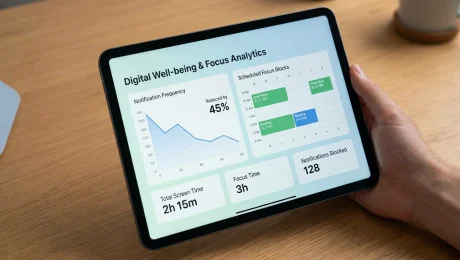
- My current average daily screen time (from Module 2): _________ hours/minutes.
- My top 3 most used apps: _________, _________, _________.
- My initial, realistic screen time reduction goal (e.g., “Reduce social media by 30 mins/day”): _________________________________________.
- My personal digital detox philosophy: _________________________________________.
Keep this visible! It’s your commitment.
The Digital Declutter: Pruning Your Digital Garden
Just like a physical space, our digital environment can become cluttered, overwhelming, and distracting. Before we even talk about using less, let’s make sure what we do use is serving us well. This module is all about creating a calmer, more intentional digital space. Think of it as spring cleaning for your phone and computer. This is one of the easiest steps to reduce screen time.
4.1 App Audit: Delete, Disable, or Delegate
Go through every single app on your phone. Yes, every single one. Ask yourself:
- Do I use this app regularly (at least once a week)?
- Does this app bring me genuine value or joy? (e.g., a tool for work, a meditation app, a way to connect with close friends).
- Or does it primarily drain my time, attention, or energy? (e.g., endless scrolling apps, games you don’t truly enjoy, news apps that cause anxiety).
Based on your answers, take action:
- Delete: If you haven’t used it in months, or if it’s a known time-sink that doesn’t add value, just delete it. You can always re-download it if you truly need it later. The friction of re-downloading often makes you reconsider.
- Disable: If it’s a system app you can’t delete, or an app you need occasionally but want to prevent from running in the background or sending notifications, disable its notifications and background refresh.
- Delegate: Some apps are useful but can be accessed via a web browser on your computer instead of your phone (e.g., certain shopping sites, specific news outlets). Consider deleting the app from your phone to reduce temptation.
4.2 Notification Overhaul: Silence the Digital Sirens
Notifications are designed to grab your attention. They pull you away from whatever you’re doing, breaking your focus. This is a huge culprit in constant phone checking.
Go into your phone’s settings and find the Notifications section. For every single app, ask yourself:
- Do I really need to be interrupted by this app in real-time?
- What’s the consequence if I see this information an hour later?
My personal rule: almost nothing needs an immediate notification.
- Turn off all non-essential notifications. This includes social media likes, comments, news alerts, game updates, shopping deals, etc.
- Keep only essential notifications. For me, this is usually calls and texts from important contacts, and perhaps a calendar reminder. Even email notifications can often be turned off, as most emails aren’t urgent.
- Consider “Summary” or “Bundled” notifications. Many phones allow you to receive a digest of notifications at specific times, rather than individually. This is a great compromise.
4.3 Home Screen Minimalism: Out of Sight, Out of Mind
Your home screen is prime real estate. If it’s cluttered with distracting apps, you’re more likely to open them.
- Remove all social media apps from your home screen. Put them in a folder on a secondary screen, or even better, in your app drawer (Android) or App Library (iOS). The extra step to find them can be enough to break the impulsive open-and-scroll habit.
- Keep only essential tools on your primary home screen. Think phone, messages, camera, maps, calendar. Apps that serve a clear, immediate purpose.
- Utilize widgets wisely. Instead of a social media feed widget, perhaps a calendar widget or a weather widget that provides information at a glance without inviting interaction.
- Consider grayscale mode. Many phones have an accessibility setting to turn your screen to grayscale. This makes the phone far less appealing and addictive, as the vibrant colors that grab our attention are gone. I often use this in the evenings to wind down.
By decluttering your digital space, you’re creating an environment that supports mindful tech use rather than encouraging constant distraction.
Crafting Your Digital Boundaries: The “No-Go” Zones
Now that your digital space is cleaner, it’s time to set up some clear rules of engagement. Boundaries are crucial for any healthy relationship, and your relationship with technology is no different. These “no-go” zones are specific times and places where your devices take a backseat. This is a powerful step in how you can focus better without your phone.
5.1 The Bedroom Boundary: Reclaim Your Sleep Sanctuary
This is perhaps the most impactful boundary you can set. Your bedroom should be a place for rest, intimacy, and relaxation, not endless scrolling or late-night notifications.
- No phones in the bedroom at least 30-60 minutes before sleep. The blue light emitted by screens can disrupt melatonin production, making it harder to fall asleep.
- Charge your phone outside the bedroom. This physically removes the temptation to check it one last time before bed or first thing in the morning. Get an old-fashioned alarm clock if you use your phone for alarms.
- If you absolutely must have your phone in the room (e.g., for emergencies): Put it on “Do Not Disturb” mode, face down, and out of arm’s reach. Ensure only critical contacts can break through DND.
I used to keep my phone on my nightstand, and I’d often find myself scrolling for an hour after getting into bed. Moving it to the living room charger was a game-changer for my sleep quality.
5.2 Mealtime Mindfulness: Eat with Your Loved Ones (or Yourself)
Meals are opportunities to connect, reflect, and truly savor your food. They are not for catching up on emails or social feeds.
- Designate mealtimes as phone-free zones. Place all phones in a basket or a designated spot away from the table.
- Engage in conversation. If you’re with others, talk! If you’re alone, practice mindful eating – pay attention to the flavors, textures, and the act of nourishing your body.
- Lead by example. If you’re a parent, this is especially important. Your children will mirror your habits.
5.3 Focus Blocks: Dedicated Time for Deep Work or Play
In our always-on culture, it’s easy for our attention to be constantly fragmented. Creating “focus blocks” is about intentionally carving out time for uninterrupted activity.
- Schedule “Deep Work” blocks: For tasks that require intense concentration, set aside 60-90 minutes. During this time, put your phone on airplane mode or in another room. Close unnecessary tabs on your computer. Treat this time as sacred.
- Schedule “Analog Play” blocks: This is equally important! Dedicate time for hobbies, reading, exercise, or simply staring out the window. Again, put your phone away. This is crucial for
reclaim focus tipsbecause it trains your brain to engage with single activities.
These boundaries aren’t about restriction; they’re about liberation. They free you from the constant pull of your devices, allowing you to choose where your attention goes.
The Analog Oasis: Rediscovering Offline Joys
One of the most common questions I hear is, “How can I focus better without my phone?” The answer isn’t just about not doing something; it’s about doing something else. When you remove the digital crutch, you create a void. This module is about filling that void with enriching, real-world experiences that nourish your soul and sharpen your focus.
6.1 Reconnecting with Hobbies (or Discovering New Ones)
Remember those things you used to love doing before your phone became your primary companion? Now is the time to bring them back!
- Dust off that old guitar, paint set, or knitting needles. Engage in activities that require your hands and your full attention. These types of activities are incredibly grounding and can be a powerful antidote to digital overwhelm.
- Explore new interests. Always wanted to try pottery, learn a language, or get into gardening? Now you have the mental space and time. Look for local classes or online tutorials (on a computer, not your phone!).
- The joy of creation. Whether it’s baking bread, writing a story, or building a model, creating something with your own hands is deeply satisfying and completely phone-free.
I recently picked up sketching again after years. It’s amazing how deeply I can get lost in the lines and shadows, completely forgetting about my phone for hours. That kind of sustained focus is incredibly refreshing.
6.2 Embracing the Outdoors: Nature’s Reset Button
Nature has a remarkable ability to calm the mind and restore focus. It’s a natural digital wellbeing booster.
- Go for a walk, a run, or a bike ride. Leave your phone at home, or at least put it on silent and in your pocket. Pay attention to the sights, sounds, and smells around you.
- Spend time in a park, a garden, or a local trail. Even sitting on a bench and observing the world around you can be a powerful antidote to screen fatigue.
- Practice “forest bathing” (Shinrin-yoku). This Japanese practice involves simply being present in nature, using all your senses to connect with the environment. It’s not about hiking; it’s about mindful immersion.
6.3 The Power of the Printed Page: Reading Real Books
There’s something uniquely satisfying about holding a physical book. The absence of hyperlinks, notifications, and endless scrolling forces a different kind of engagement.
- Keep a physical book handy. Instead of reaching for your phone when you have a spare moment (waiting for an appointment, during your commute), reach for a book.
- Create a reading nook. A comfy chair, good lighting, and no digital distractions can make reading a truly immersive experience.
- Explore different genres. Don’t feel pressured to read “serious” books. Fiction, biographies, poetry – whatever captures your imagination.
By intentionally filling your time with these analog activities, you’re not just avoiding your phone; you’re actively enriching your life. You’re training your brain to find satisfaction and engagement in the real world, which is the ultimate goal of any Digital Detox Guide.
Smart Tech, Mindful Use: Leveraging Tools for Good
It might sound counterintuitive, but sometimes, technology can help us use less technology. The key is to be intentional about which tools we use and how we use them. This module explores how to leverage your existing devices and apps to support your screen time reduction goals, rather than hinder them.
7.1 Built-in Device Features: Your Phone’s Secret Weapons
Your smartphone likely has powerful features designed to help you manage your digital habits. We touched on some in Module 2, but let’s dive deeper.
- App Limits (iOS Screen Time / Android Digital Wellbeing): This is a game-changer. You can set daily time limits for specific apps (e.g., “Social Media: 60 minutes/day”). Once you hit the limit, the app locks you out. It creates a moment of friction, prompting you to reconsider if you really need more time. I use this for my most distracting apps, and it’s surprisingly effective.
- Downtime/Focus Modes (iOS) / Focus Mode (Android): These features allow you to schedule periods where only essential apps and contacts are available. You can set it for bedtime, work hours, or any time you need uninterrupted focus. It’s like putting your phone into a temporary “do not disturb” for everything but what truly matters.
- Grayscale Mode: As mentioned before, turning your screen to black and white makes it significantly less appealing. The vibrant colors that app designers use to grab your attention are gone. It’s often found in Accessibility settings. I toggle this on in the evenings to signal to my brain that it’s time to wind down.
- “Do Not Disturb” (DND) Customization: Don’t just turn it on; customize it. Allow calls from “Favorites” or “Repeated Calls” for emergencies, but silence everything else. Schedule it to turn on automatically during your sleep hours.
7.2 Third-Party Apps for Enhanced Control
While I advocate for using built-in tools first, some third-party apps offer more advanced features for mindful tech use.
- Website/App Blockers: Apps like Freedom, Cold Turkey (desktop), or Forest (mobile) allow you to block distracting websites and apps for set periods. Forest is particularly clever: you plant a virtual tree, and if you leave the app before your timer is up, your tree dies. It gamifies staying focused.
- Time Trackers: While your phone has built-in tracking, apps like RescueTime (desktop) or QualityTime (Android) offer more detailed insights and reporting, helping you stay accountable.
- Meditation/Mindfulness Apps: Apps like Calm or Headspace can be invaluable for training your attention and reducing stress, offering a healthy alternative to mindless scrolling when you feel overwhelmed. Use them intentionally, not as another distraction.
Actionable Tip: Configure Your App Limits
Go to your phone’s settings (Screen Time on iOS, Digital Wellbeing on Android).

- Find the “App Limits” or “App Timers” section.
- Select categories like “Social Networking” or individual apps that you identified as time-sinks in Module 2.
- Set a realistic daily limit (e.g., 30 minutes, 1 hour).
- Observe how this feels. The first few times you hit the limit, it might feel frustrating, but it’s a powerful reminder to disengage.
The goal here isn’t to add more apps to your life, but to strategically use a select few that genuinely help you achieve your digital wellbeing goals. Think of them as guardrails, not crutches.
Navigating Social Media & Communication Mindfully
For many, social media is the biggest hurdle in screen time reduction. It’s designed to be addictive, constantly pulling you back in with notifications, endless feeds, and the fear of missing out. But it’s also a powerful tool for connection. This module is about learning to engage with social media and digital communication on your terms.
8.1 The Intentional Scroll: Quality Over Quantity
Instead of mindlessly opening social media apps, try to cultivate intentionality.
- Define your purpose before opening the app. Are you checking a specific friend’s update? Looking for inspiration? Responding to a message? If you don’t have a clear purpose, reconsider opening it.
- Set a timer. Before you open Instagram or TikTok, set a timer for 5 or 10 minutes. When it goes off, close the app. This helps break the endless scroll.
- Curate your feed ruthlessly. Unfollow accounts that make you feel bad, anxious, or that simply don’t add value. Mute people you don’t want to unfollow but whose content you don’t need to see daily. Follow accounts that inspire, educate, or genuinely entertain you. Your feed should be a source of positivity, not comparison or dread.
- Engage, don’t just consume. Instead of passively scrolling, try to actively engage with content you genuinely appreciate. Leave a thoughtful comment, share something meaningful. This shifts your mindset from passive consumption to active participation.
8.2 Communication Boundaries: You Control the Flow
Digital communication, especially messaging apps, can feel like a constant stream of demands. It’s time to set some boundaries here too.
- Batch your replies. Instead of responding to every message as it comes in, designate specific times of the day to check and respond to messages (e.g., once in the morning, once in the afternoon). This reduces context switching and allows for deeper focus.
- Manage group chats. Group chats can be notorious time-sinks. Mute notifications for less essential groups. You can still